

Compress PDF Documents – Reduce File Size Without Losing Quality
Compressing PDF documents is the process of reducing the file size of a PDF while maintaining its readability and formatting quality. Whether you’re sharing files via email, uploading documents to a website, or saving storage space, PDF compression helps make your documents smaller, faster to load, and easier to manage.
What Does Compressing a PDF Mean?
When you compress a PDF document, unnecessary data such as large images, embedded fonts, metadata, and duplicate objects are optimized or reduced. This process minimizes file size without significantly affecting the visual appearance of the document. Compression can be done using online tools, desktop software, or built-in PDF editors.
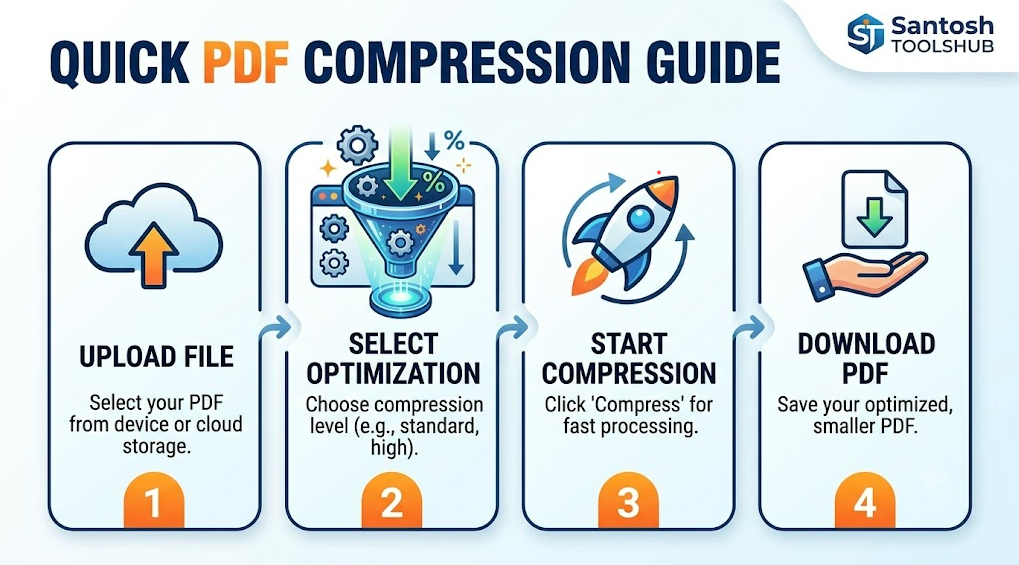
Why Is PDF Compression Important?
- Faster Upload & Download Speeds – Smaller files transfer quickly.
- Email-Friendly Attachments – Avoid file size limits.
- Improved Website Performance – Optimized PDFs load faster for users.
- Cloud Storage Savings – Save space on Google Drive, Dropbox, or other platforms.
- Better User Experience – Quick access on desktop and mobile devices.
How PDF Compression Works
PDF compression tools typically use several techniques:
- Image Downsampling – Reduces image resolution while keeping clarity.
- Image Compression – Converts images to efficient formats like JPEG.
- Font Optimization – Removes unused font data.
- Metadata Removal – Deletes hidden or unnecessary file information.
- Object Stream Compression – Reorganizes internal data for efficiency.
Types of PDF Compression Levels
Most tools offer different compression settings:
- Low Compression – Best for high-quality printing.
- Medium Compression – Balanced quality and file size.
- High Compression – Maximum file reduction for web or email sharing.
Best Use Cases for Compressed PDFs
- Sending resumes and business proposals
- Uploading documents to job portals
- Sharing eBooks or reports online
- Submitting assignments or official forms
- Archiving documents for long-term storage
Conclusion
Compressing PDF documents is an essential step for improving file management, online sharing, and digital efficiency. By reducing file size while preserving quality, PDF compression ensures smooth performance across devices and platforms. Whether for business, education, or personal use, optimized PDFs help streamline your digital workflow.