
compress-pdf

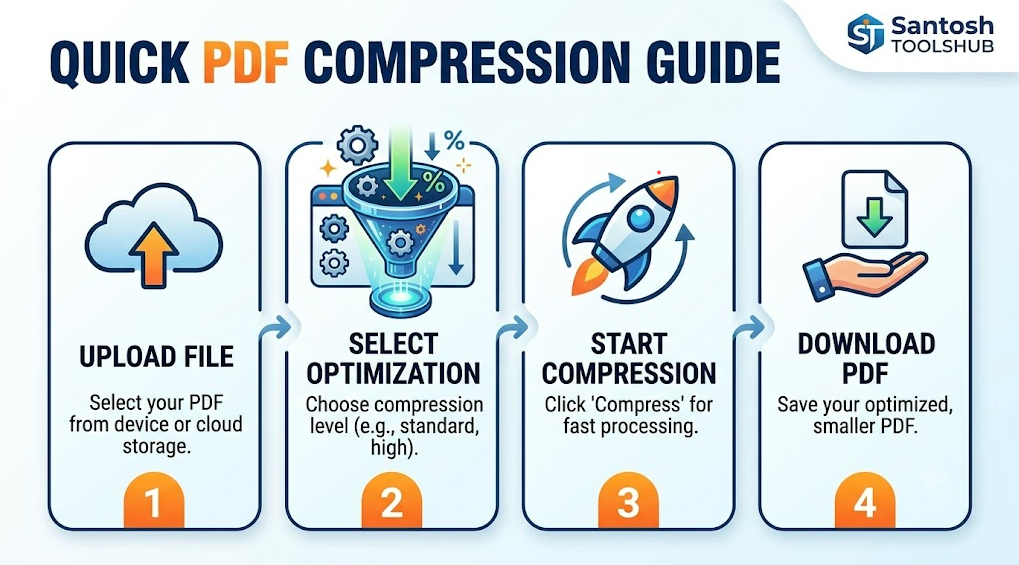
How Compress PDF Tools Works

Compress PDF Documents – Reduce File Size Without Losing Quality

Compress PDF documents is the process of reducing the file size of a PDF while maintaining its readability and formatting quality. Whether you’re sharing files via email, uploading documents to a website, or saving storage space, PDF compression helps make your documents smaller, faster to load, and easier to manage.

What Does Compressing a PDF Mean?

When you compress a PDF document, unnecessary data such as large images, embedded fonts, metadata, and duplicate objects are optimized or reduced. This process minimizes file size without significantly affecting the visual appearance of the document. Compression can be done using online tools, desktop software, or built-in PDF editors.
Why Is PDF Compression Important?

  • Faster Upload & Download Speeds – Smaller files transfer quickly.
  • Email-Friendly Attachments – Avoid file size limits.
  • Improved Website Performance – Optimized PDFs load faster for users.
  • Cloud Storage Savings – Save space on Google Drive, Dropbox, or other platforms.
  • Better User Experience – Quick access on desktop and mobile devices.

How PDF Compression Works

PDF compression tools typically use several techniques:

  • Image Downsampling – Reduces image resolution while keeping clarity.
  • Image Compression – Converts images to efficient formats like JPEG.
  • Font Optimization – Removes unused font data.
  • Metadata Removal – Deletes hidden or unnecessary file information.
  • Object Stream Compression – Reorganizes internal data for efficiency.

Types of PDF Compression Levels

Most tools offer different compression settings:

  • Low Compression – Best for high-quality printing.
  • Medium Compression – Balanced quality and file size.
  • High Compression – Maximum file reduction for web or email sharing.

Best Use Cases for Compressed PDFs

  • Sending resumes and business proposals
  • Uploading documents to job portals
  • Sharing eBooks or reports online
  • Submitting assignments or official forms
  • Archiving documents for long-term storage

Conclusion

Compressing PDF documents is an essential step for improving file management, online sharing, and digital efficiency. By reducing file size while preserving quality, PDF compression ensures smooth performance across devices and platforms. Whether for business, education, or personal use, optimized PDFs help streamline your digital workflow.
split-pdf

How Split PDF Tools Works

Split PDF Documents – Fast, Secure & Easy PDF Page Separator Tool

Split PDF Documents is a powerful online tool that allows users to quickly divide large PDF files into smaller, manageable files. Whether you need to extract specific pages, separate chapters, or break a multi-page document into individual files, this tool makes the process simple and efficient.

Key Features of Split PDF Documents

  • Extract Specific Pages – Select individual pages or page ranges to create a new PDF file.
  • Split by Page Range – Divide PDFs into multiple documents based on custom page numbers.
  • Batch PDF Splitting – Process large files in seconds without losing quality.
  • Secure & Private – Uploaded files are encrypted and automatically deleted after processing.
  • No Software Installation Required – Works directly in your web browser on Windows, Mac, Linux, iOS, and Android devices.
  • High-Quality Output – Maintains original formatting, images, and layout.

Why Use a PDF Splitter Tool?

Splitting PDF files helps improve document organization, reduce file size for email sharing, and simplify document management. It’s ideal for:

  • Students separating textbook chapters
  • Professionals sharing selected report pages
  • Businesses organizing invoices or contracts
  • Legal teams extracting case documents

How to Split a PDF File Online

  1. Upload your PDF document.
  2. Choose the pages or page ranges to split.
  3. Click the “Split PDF” button.
  4. Download your newly created PDF files instantly.

Benefits of Online PDF Splitting

Using an online PDF splitter saves time, increases productivity, and eliminates the need for expensive desktop software. It ensures compatibility across devices and allows quick access anytime, anywhere.


Split PDF Documents is the perfect solution for anyone looking to divide, extract, or manage PDF files effortlessly. Try it today for fast, reliable, and secure PDF page splitting.

merge-pdf

How Merge PDF Tools Works

What Is a PDF File?

A PDF (Portable Document Format) is a universal file format created by Adobe Inc. in 1993 to present documents consistently across all devices and operating systems. Unlike Word or other editable formats, a PDF preserves fonts, images, layouts, and formatting exactly as intended.

What Does Merge PDF Mean? A Simple Guide

Merge PDF means combining two or more PDF files into one single document. Instead of sending multiple files, you can organize everything into one easy-to-share PDF.

Merging PDFs is useful for students, businesses, and professionals who need to combine reports, invoices, contracts, or presentations. It helps keep documents organized and saves time when sharing files.

Most online PDF tools allow you to upload files, arrange pages, and merge them instantly. The original files remain unchanged, and the final merged PDF can be downloaded in seconds.

If you regularly handle digital documents, using a merge PDF tool can improve productivity and document management.

merge PDF, combine PDF files, PDF merger, online PDF tool

PDF files can include:

Text, Images, Hyperlinks, Forms, Buttons, Videos, Digital signatures and Interactive elements. PDFs work on Windows, macOS, Linux, Android, and iOS without formatting changes.

Why You Should Merge PDF Files

Merging PDF files helps you manage documents more efficiently. Instead of handling multiple attachments, you can combine everything into one professional file.

For example, businesses merge invoices and contracts into one document. Students combine assignments and research papers into a single submission file. This makes sharing and storing documents easier.

Online PDF merge tools are fast, secure, and simple to use. You just upload files, arrange them in order, and download the final combined PDF.

Merging PDFs improves organization, reduces confusion, and ensures smooth document sharing.

merge PDF online, combine PDF documents, PDF file merger, free PDF merge tool

Key Features of PDF Files

Universal Compatibility

PDFs can be opened with: Adobe Acrobat Reader, Web browsers like Google Chrome, Mobile apps on Android and iOS, This makes them one of the most widely supported file formats worldwide.

Fixed Formatting

PDFs preserve: Fonts, Margins, Graphics, Layout structure, Perfect for official documents and professional materials.

Security Options

PDF files allow: Password protection, Encryption, Digital signatures, Permission controls (print, copy, edit restrictions). These features make PDFs ideal for contracts and confidential data.

Compression

PDFs compress high-quality images and text into smaller file sizes for easier sharing via email or website downloads.

Common Uses of PDF Files

PDF files are used in nearly every industry. Below are major use cases:

Business & Corporate

  • Contracts and agreements
  • Invoices and receipts
  • Reports and presentations
  • Employee manuals

Education

  • E-books
  • Research papers
  • Study materials
  • Online worksheets

Marketing & SEO

  • Lead magnets
  • Whitepapers
  • Brochures
  • Product catalogs

Government & Legal

  • Official forms
  • Applications
  • Policies
  • Legal documentation

Benefits of Using PDF Files

Professional Appearance

PDFs maintain branding elements like logos, typography, and structured layout.

Cross-Platform Accessibility

Users can open PDFs on any device without installing special software.

Secure Sharing

Sensitive documents can be encrypted and protected.

Print-Ready Quality

PDFs are ideal for high-resolution commercial printing.